


Version 0.9.0 · Free · No account needed · Runs locally in your browser
DM Companion is a local campaign workspace for Dungeon Masters. It keeps your sessions, NPCs, locations, quests, handouts, lore, calendar events, items, and maps in one place — and connects them to each other.
It won’t fix your pacing or stop your players from derailing everything within twelve minutes. What it will do is answer the important questions: Where is everyone right now? What do my players actually know? Which NPCs have they met — and did I accidentally kill one off already? What nonsense did I improvise three sessions ago that is now canon?
↓ Download DM Companion v0.9.0
Zip-File with Single HTML file and Manual · Works offline · No install required
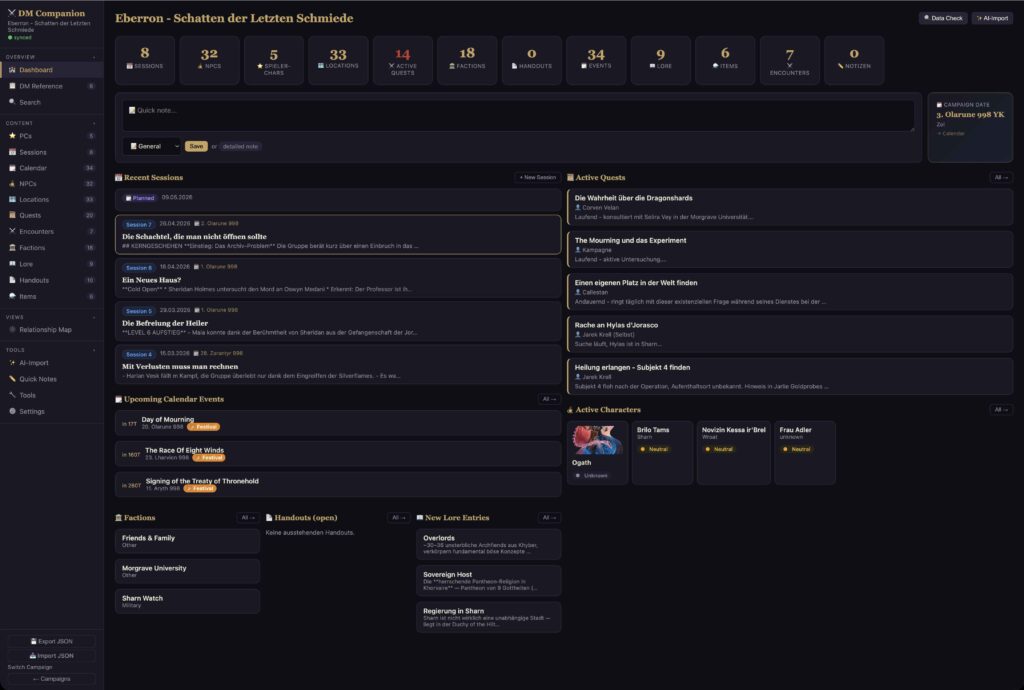
Your friendly DM-Tool
What’s inside
The app is organised into sections, accessible from the sidebar:
- Dashboard — A quick overview of open quests, upcoming events, and recent sessions.
- DM Reference — Your personal DM screen. A place for tables, rules, and quick-reference notes you always need mid-session.
- Sessions — Session summaries, player journal entries, linked NPCs, locations, quests, encounters, and handouts. Navigate your campaign timeline forwards and backwards.
- NPCs & PCs — Characters with relationships, current locations, secrets, and faction affiliations.
- Calendar — Campaign dates, historical events, travel, festivals, and reminders. Supports multiple fantasy calendar systems including Greyhawk, Faerûn, Eberron, and custom.
- Locations — Places, sub-locations, map references, and notes.
- Quests — Goals, progress, priority, status, and linked entities.
- Handouts — Letters, clues, riddles, maps, prophecies, and other player-facing material. Track whether players have already received them.
- Factions & Lore — Political groups, world history, and campaign secrets.
- Items & Encounters — Magic items, loot, and combat encounters.
Everything is connected. You don’t just write down an NPC — you track which faction they belong to, when they first appeared, where they currently are, and how they feel about the party. Items can be assigned to characters, quests linked to locations, sessions tied to everything relevant.
Most text fields support Markdown formatting: headings, bold, lists, links, and simple tables.
Getting started
- Download the ZIP file and extract the HTML file.
- Open the HTML file in any modern browser — no installation required.
- Create a campaign.
- Add your key NPCs, locations, factions, and quests.
- Create a session before or after play and link it to the relevant entries.
- Use the calendar to track campaign dates and events.
- Use tags consistently — they make searching and filtering much more useful over time.
Sync and backup
DM Companion saves everything locally in your browser. No account, no cloud, no subscription required.
If you work across multiple devices, the recommended workflow is simple:
- Open Settings → Cloud Sync and connect or create a JSON data file.
- Save that file in iCloud Drive, Dropbox, Google Drive, or another synced folder.
- On another device, open the same file to continue working with the same campaign data.
If your browser doesn’t support direct file sync, use manual export and import instead: export your data as a JSON file, save it somewhere safe, and import it on another device when needed.
Important: Browser local storage is not a backup. Export your JSON file regularly. Treat it like your campaign notebook — you wouldn’t leave that at the game table either.
Download
↓ Download DM Companion v0.9.0
Single HTML file · Works offline · No account · No install · Version 0.9.0 · 2026-05-02
Please note: DM Companion is currently in beta. It has been stable in testing, but you may encounter rough edges. The AI-assisted input feature is not yet functional in this version. I started the App in German, so there might be some leftovers but most labels are language neutral or English.
If something breaks in a spectacular way, or you have ideas for features, let me know.
Created by Gregor Vogt · www.gregorvogt.com